Best practices for optimizing Swiftask credit usage
Written By Stanislas
Last updated 16 days ago
Overview
Every interaction with an AI agent in Swiftask consumes credits. The amount you spend depends not just on the LLM you choose, but on how you design your agents, craft your prompts, structure your conversations, and manage your knowledge bases. By following these best practices, you can deliver better results while spending fewer credits.
This guide covers practical strategies to help you optimize credit usage across all aspects of Swiftask—from agent setup to conversation management to cost control.
Prerequisites
To apply these best practices, you should:
Have a Swiftask workspace and basic familiarity with creating agents
Understand that different tasks require different approaches to credit optimization
Be willing to test and refine your agent configuration based on results
Tip 1: Agent design strategy
The foundation of credit optimization is building the right agent for the right job.
Start with a clear purpose.
A general-purpose agent that tries to do everything will make inefficient decisions, ask unnecessary follow-up questions, and consume more credits than a specialized agent. The default Swiftask greeting agent, for example, is designed to welcome users and direct them to the right resources—not to perform specialized tasks like detailed document analysis or technical support.
Build custom agents for specific use cases.
Instead of relying on a single general agent, create focused agents for each major task: one for customer support, one for document processing, one for research, and so on. A specialized agent knows exactly what it should do, makes fewer wrong turns, and costs less to run.
Avoid agent bloat.
Just because you can add a skill doesn't mean you should. Each skill you add increases the agent's decision-making overhead and the chance it will use the wrong tool for a given question. Include only the skills your agent actually needs.
Tip 2: LLM selection and matching
Not all tasks require the most powerful (and most expensive) LLM. Swiftask gives you access to models at different cost levels and with different strengths.
Understand the cost difference.
Each LLM model has a different credit cost per word. In the AI Library, you can see the estimated cost for each model. A simple task—like answering a factual question or reformatting text—may be handled just as well by a cost-optimized model as by a premium model.
Match the model to the task.
Ask yourself: Is this a simple question, or does it require reasoning across multiple sources? Does it need web search, document understanding, or creative text generation? Different models excel at different things:
Use cost-optimized models for straightforward, factual tasks
Use general-purpose models for multi-step reasoning
Use specialized models when you know the task requires their specific strength (e.g., web search, code generation, document analysis)
Remember that simple for humans is not simple for AI.
A question that seems straightforward to you might require the agent to search for information, cross-reference documents, or make multiple API calls. The agent's actual workload is often more complex than it appears. When in doubt, test with a cost-optimized model first and upgrade only if needed.
Tip 3: Prompt engineering for efficiency
Your prompt is the instruction set for your agent. A well-written prompt saves credits by reducing confusion, preventing hallucinations, and avoiding unnecessary follow-up questions.
Be concise
Every word in your prompt is processed by the LLM. Longer prompts cost more and often perform worse. Remove filler, repetition, and unnecessary context. Keep your instructions clear and direct.
Include static information directly in the prompt
If there is information that will not change—company policies, product names, standard procedures, reference data—put it in the prompt instead of asking the agent to look it up. This avoids costly loops where the agent searches for information it already needs.
Provide usage guidance for skills
If your agent has skills (like web search or document retrieval), include brief examples or guidance in the prompt showing when and how to use each one. This prevents the agent from guessing, which often leads to unnecessary tool calls and wasted credits.
Avoid hallucinations
Vague or overly complex prompts encourage the LLM to make up information. Be specific about what you want, what sources it should use, and what it should do if it doesn't know the answer. A precise prompt is cheaper and more reliable.
Tip 4: Conversation management
The longer a conversation runs, the more expensive each new message becomes. This is because the LLM has to process the entire conversation history each time.
Start a new chat when conversations become heavy.
Swiftask will alert you when a conversation has reached a significant size (around 200,000 credits of context). At that point, start a fresh conversation. The cost savings can be substantial because the new conversation has a clean history.
Start a new conversation when the topic is unrelated
When If your new questions or topic have nothing to do with the previous conversation, start a fresh conversation. This ensures you’re not paying for irrelevant context processing.
Understand why heavy conversations cost more.
When you ask a question in a conversation that already contains many previous messages and large documents, the LLM has to process all of that history to understand the context. A simple question in a light conversation might cost much less than the same question in a heavy conversation.
Manage attachments carefully.
If you attach a document to a single question, that document is processed only for that exchange. If you add a document to your agent's knowledge base, it will be processed with every relevant question going forward. Use attachments for one-off requests and knowledge bases for recurring tasks.
Tip 5: Skill configuration
Skills are powerful, but each one adds complexity to your agent's decision-making.
Include only relevant skills.
Review your agent's purpose. Does it really need web search? Does it need code execution? Does it need document retrieval? Include only the skills that directly support its mission.
Minimize the number of skills.
The more skills an agent has, the more time it spends deciding which one to use, and the more likely it is to make the wrong choice. This increases both latency and credit consumption. A focused agent with three well-chosen skills will outperform a bloated agent with ten.
Provide clear skill guidance.
In your prompt, explain which skill to use for which type of request. For example: "Use web search only for current events or real-time information. Use document retrieval for company policies. Use code execution only when the user explicitly asks for code output." This reduces guessing and wasted tool calls.
Tip 6: Knowledge base strategy
How you organize your knowledge base affects both performance and cost.
Use attachments for one-off requests.
If a user is asking a question about a specific document they just uploaded, use an attachment. The document is processed only for that question.
Use knowledge bases for recurring tasks.
If you have documentation that your agent will reference repeatedly, add it to the knowledge base. The cost is amortized across many questions.
Avoid redundancy.
Don't add the same document to the knowledge base multiple times. Don't add documents that will rarely be used. Keep your knowledge base focused and lean.
Choose the right format.
Structured documents (like CSV files or well-organized PDFs) are easier for the LLM to process than unstructured text. This can reduce the number of tokens consumed per question.
Tip 7: Python code interpreter best practice
If your agent uses a Python code interpreter, planning is essential.
Plan before executing.
Include an instruction in your prompt asking the agent to explain its plan before running any code. For example: "Before executing any code, outline the steps you will take and explain your approach. Then execute the code." This prevents loops where the agent generates code, it fails, the agent tries again, and so on.
Avoid trial-and-error.
Each code execution consumes credits. Encourage the agent to think through the logic, check for edge cases, and get it right the first time rather than iterating blindly.
Limit code complexity.
If a task requires very complex code generation, consider breaking it into smaller sub-tasks that each agent can handle independently.
Tip 8: File processing and sub-agents
Large files and complex multi-step tasks benefit from a divide-and-conquer approach.
Split large files.
If you have a CSV with 10,000 rows or a PDF with hundreds of pages, don't process it all at once. Most LLMs have token limits and may fail or produce incomplete results. Instead, split the file into smaller chunks and process each one separately.
Use sub-agents for complex tasks.
If a task involves multiple steps—like extracting data from a file, transforming it, and then generating a report—consider creating sub-agents for each step. The main agent orchestrates the sub-agents, and each sub-agent stays focused on its part of the job. This can reduce errors and credit waste.
Batch similar requests.
If you have many similar requests (like processing 100 customer inquiries), batch them together and process them in groups. This is more efficient than handling them one at a time.
Tip 9: Prompt library
Swiftask includes a Prompt Library where you can save and reuse well-crafted prompts.
Create a library of proven prompts.
When you craft a prompt that works well for a task, save it. Over time, you'll build a library of tested, optimized prompts that you and your team can reuse.
Reuse instead of recreating.
When you need a similar prompt for a new agent, start with an existing prompt from the library rather than writing from scratch. This ensures consistency and saves time.
Version and refine.
As you learn what works, update your prompts in the library. Remove outdated or inefficient versions.
Tip 10: Cost control and monitoring (for publicly shared agents)
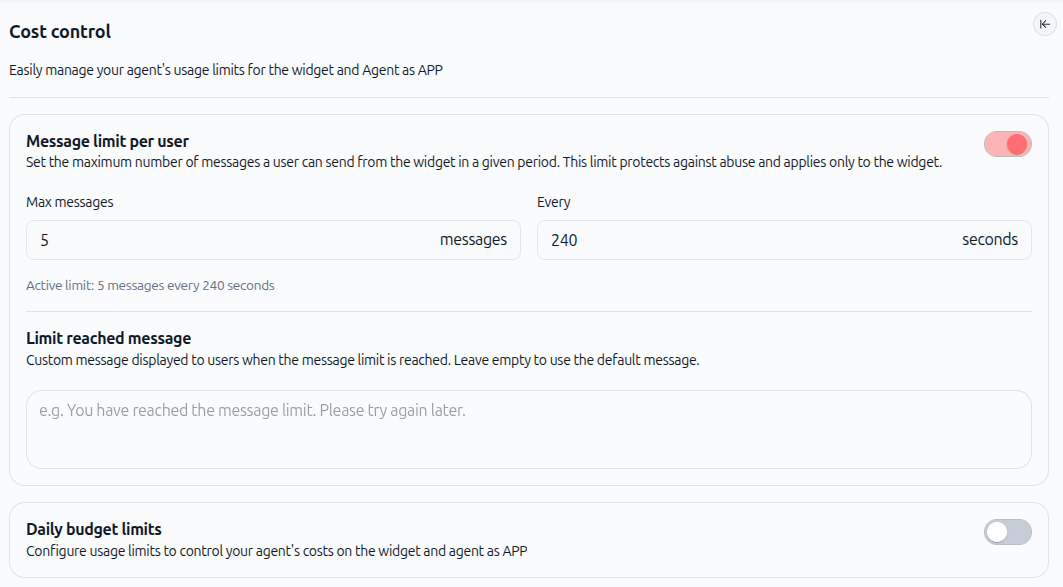
Cost control is available only for agents shared publicly. Use the Cost Control feature to set message limits and daily budgets for your public agents.
Access Cost Control.
For publicly shared agents, in your agent configuration, look for the Cost Control button in the left panel. This is where you manage all usage limits and budget settings.

Set message limits per user.
You can limit how many messages a user can send in a given time period. For example, you might allow 5 messages every 240 seconds. This protects against abuse and uncontrolled usage.
Set daily budget limits.
Configure a daily budget limit for your agent. Once the limit is reached, the agent stops responding until the next day. This is useful for controlling costs in production environments.
Customize limit messages.
When a user reaches the message limit, you can display a custom message (or use the default). This keeps users informed without confusion.
Monitor usage in the dashboard.
Your workspace dashboard shows credit usage by day and by agent. Review it regularly to identify agents or use cases that consume more than expected. Use this data to refine your agent configuration.
Set up email alerts.
Swiftask can send you an email notification when you reach certain credit thresholds (like 1 million credits consumed). Use these alerts to stay aware of your consumption.
Practical use cases
Use case 1: Customer support chatbot
A customer support agent handles common questions about products and policies. To optimize credits:
Create a single, focused agent for support (not a general agent)
Include company policies, product FAQs, and troubleshooting steps directly in the prompt
Include only the skills it needs: document retrieval (for knowledge base), and optionally ticket creation (if integrated)
Use a cost-optimized LLM, since most questions are factual and repetitive
Set message limits to prevent abuse: e.g., 10 messages per user per day
Monitor the dashboard to see which question types consume the most credits; refine the prompt to handle those cases more efficiently
Result: A focused, efficient agent that costs 30–50% less than a general-purpose agent, while delivering faster responses.
Use case 2: Document analysis agent
An agent that analyzes contracts, reports, or other documents. To optimize credits:
Create a specialized agent for document analysis
Include instructions in the prompt about what to extract, summarize, and ignore
Use a model optimized for document understanding (like Mistral) rather than a general model
For large files (>50 pages), split them into sections and process each section separately
Use sub-agents if the task involves multiple steps (e.g., extract data, then generate a summary, then identify risks)
Attach documents as one-off attachments rather than adding them to the knowledge base (unless they're referenced repeatedly)
Result: Faster analysis, fewer hallucinations, and lower credit costs than processing entire documents at once.
Next steps
Now that you understand the principles of credit optimization, here's how to apply them:
Audit your current agents. Review the agents you've already created. Which ones have too many skills? Which ones use expensive LLMs for simple tasks? Note areas for improvement.
Start with one agent. Pick one agent that consumes the most credits or handles the most important task. Apply the strategies from this guide: refine the prompt, reduce skills, test a cheaper LLM, and set cost controls.
Measure the impact. Before and after making changes, note the credit consumption in the dashboard. Track how much you save and what trade-offs (if any) you notice in performance.
Build your prompt library. Start saving the prompts that work well. Share them with your team so everyone benefits from optimized prompts.
Review quarterly. Set a reminder to review your agent performance and credit costs every three months. Adjust as needed based on actual usage patterns.
Share best practices with your team. If you work in a team, share what you've learned. Consistency across agents leads to better overall credit efficiency.
Was this helpful?
Still need help? Ask the team