Shared session for sub-agents
Written By Stanislas
Last updated 16 days ago
Overview
Shared session maintains a continuous child conversation session for a sub-agent when invoked by an orchestrator agent. In Swiftask, this feature is controlled by the Keep sub agent discussion in the same session setting.
When enabled, the orchestrator preserves the sub-agent's conversation history across multiple delegations within the same parent chat or task. The sub-agent retains prior context, generated data, and previous deliverables instead of starting from scratch each time.
When disabled, each invocation runs in an isolated, stateless session. This mode is optimal for independent actions where previous context is irrelevant.
Comparison: Shared session vs. isolated session
Prerequisites
Access to the Agents section in your Swiftask workspace
An existing orchestrator agent (parent agent)
Workspace permissions to configure agents and attach sub-agents
Step-by-step guide
Method 1: Enable shared session when attaching a sub-agent
Navigate to Agents from the left navigation bar and open your parent agent.
In the configuration menu under Agent Instruction, select Sub agents.
Click + Attach sub agent in the top-right corner to open the configuration modal.
Toggle Keep sub agent discussion in the same session to the active position.
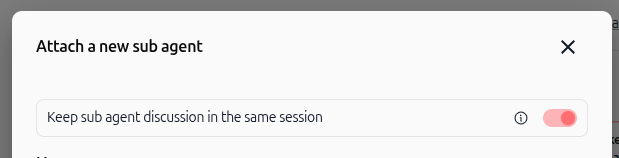
Fill in the sub-agent skill name, invocation criteria, and select your target agent, then click Attach sub agent.
Method 2: Manage shared session directly from the canvas
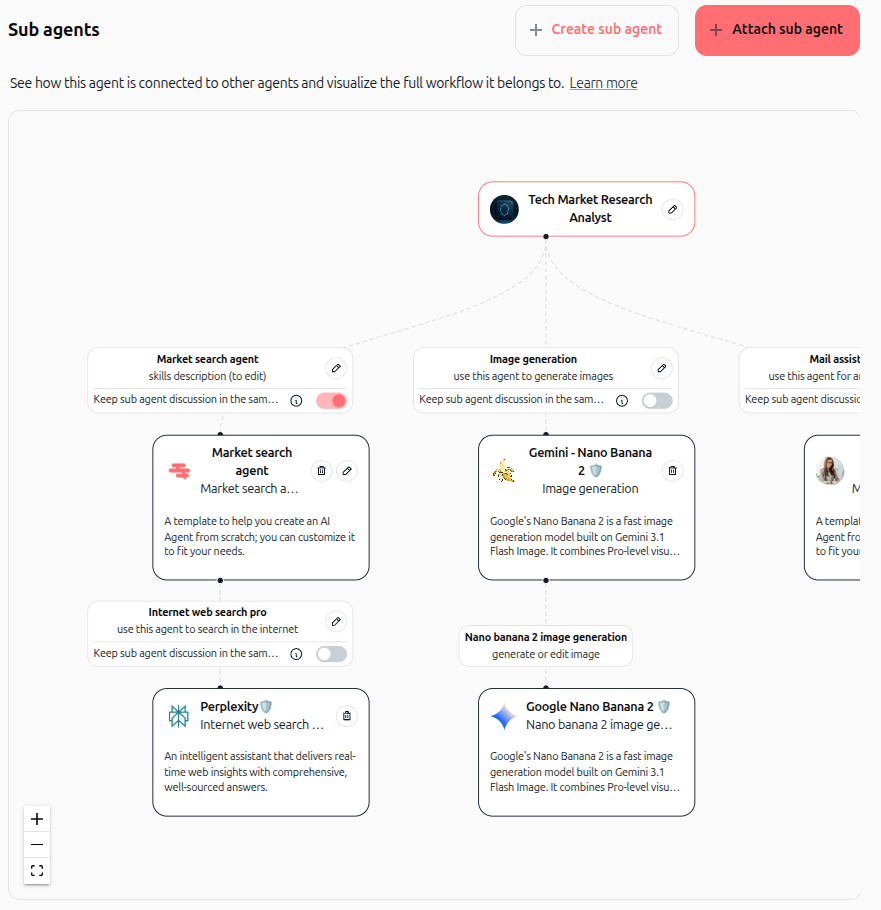
In your parent agent settings, go to the Sub agents visual canvas.
Locate the sub-agent card in the visual hierarchy tree.
Switch the Keep sub agent discussion in the same session toggle directly on the node card to activate or deactivate persistence.
Practical use cases
Iterative market research: An orchestrator delegates company identification to a research sub-agent. In a follow-up query, the parent agent asks for executive contacts and financial metrics for those companies. With shared session active, the sub-agent references its earlier findings directly without repeating the initial search.
Multi-stage document drafting: A writing sub-agent creates a project brief in the first step. When the parent agent requests refinements to the timeline or budget in subsequent turns, the sub-agent modifies the existing draft while preserving the full editorial context.
Stateless single-purpose tasks (Disabled): An image generation sub-agent produces standalone illustrations from text prompts. Disabling shared session ensures each request starts in a clean environment without carrying forward prior generation prompts or consuming unnecessary token history.
Tips & best practices
Activate for multi-turn collaboration: Keep the toggle on whenever a sub-agent needs to refine, expand, or follow up on previous outputs.
Deactivate for isolated actions: Turn off shared session for deterministic, standalone tools such as format converters, image generators, or single-turn calculations to reduce context overhead.
Inspect execution traces: Use the real-time conversation sidebar or execution cards in chat to view the sub-agent's complete reasoning, tool calls, and session timeline.
Troubleshooting
Sub-agent does not remember prior instructions or outputs
Cause: The Keep sub agent discussion in the same session toggle is switched off on the sub-agent node.
Fix: Open the Sub agents canvas, locate the child agent card, and turn the toggle on.
Context persists across different parent conversations
Cause: Expecting sub-agent sessions to reset while continuing in the same chat thread.
Fix: Sub-agent session continuity is scoped strictly to the current parent chat thread or task. Starting a new conversation automatically initializes a fresh session for all attached sub-agents.
Additional resources
Agent configuration guide
Skills overview
Was this helpful?
Still need help? Ask the team