Credit usage
Written By Stanislas
Last updated 16 days ago
Overview
Swiftask AI credits are a universal unit of measurement used to compare and bill the usage of all AI models on the platform. Every time you perform an action with an AI feature, it deducts credits from your available balance.
Different AI models require different amounts of computing resources, ranging from lightweight chat assistants to complex image generators and document parsers. Credits establish a unified currency across all tools, ensuring clear tracking and billing proportional to the actual work performed.
Prerequisites
Before viewing your credit usage, make sure you have:
An active Swiftask account.
Access to the workspace where you want to review credit consumption.
Access to Account Settings from the sidebar menu.
Step-by-step guide
Accessing credit usage
Click the Settings icon in the bottom-left corner of the left sidebar.
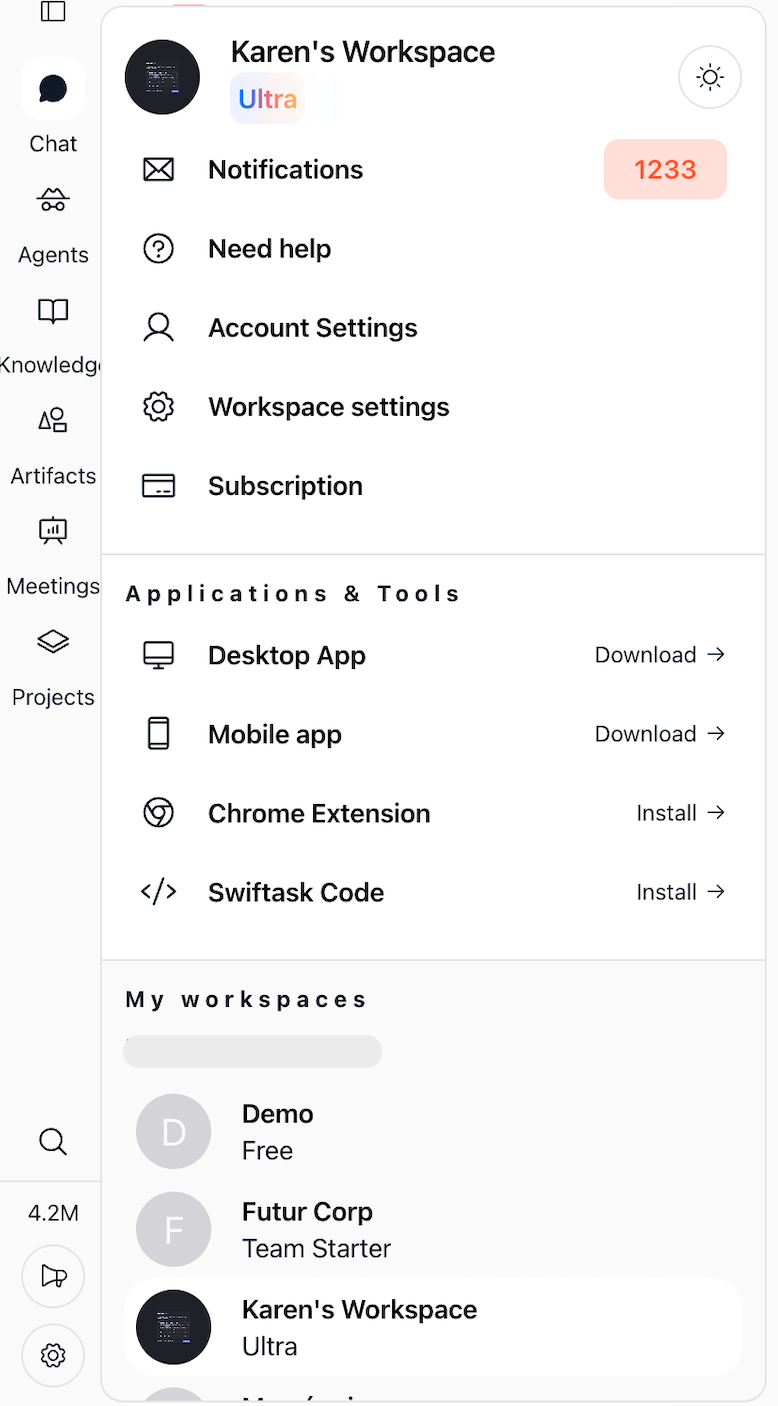
In the menu, select Account Settings.
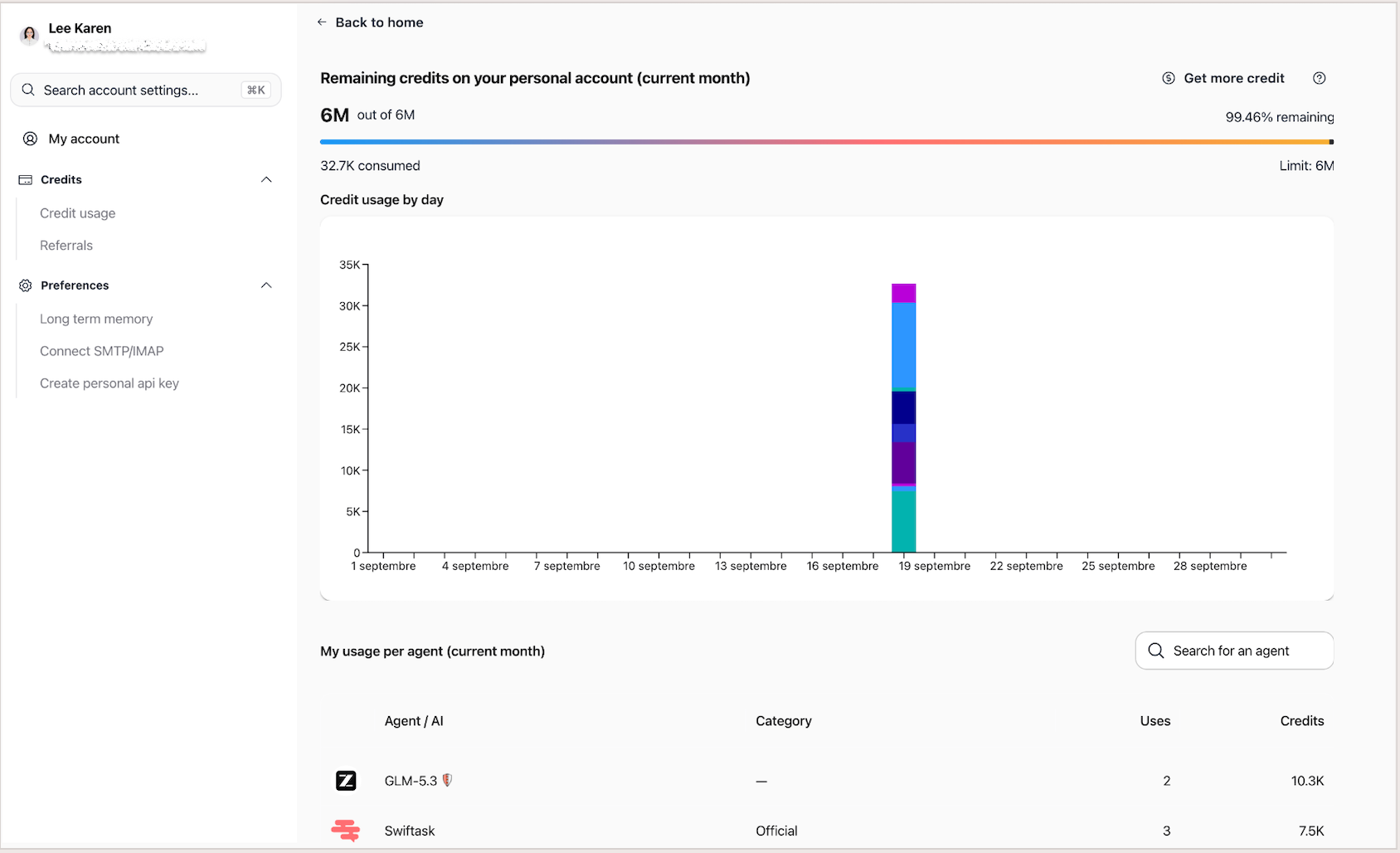
In the left navigation, click Credits.
Select Credit usage.
Understanding how credits are calculated
Each AI model has an assigned rate, also known as a coefficient, that represents its operating cost. A standard AI model has a rate of 1, high-performance models (such as image generation or video analysis) have rates greater than 1, and lightweight models have rates below 1.
The system calculates consumed credits using a simple formula:
Credits consumed = Usage volume × AI model rate
The measured volume depends on the AI category:
Here are concrete calculation examples:
More demanding tasks and more capable models consume more credits because they require more processing power.
Understanding credit sources and consumption order
Your workspace draws credits from two separate pools:
Monthly subscription credits: Included in your subscription tier and refreshed automatically each month on your billing anniversary date. If your workspace administrator sets a personal member limit, that threshold applies first.
Extra credits: Purchased at any time as one-time top-ups or received as promotional credits. They do not renew, never expire, and remain on your account until fully used.
When you execute an AI action, Swiftask processes your balance in the following order:
Monthly subscription credits are consumed first.
If monthly credits are depleted, Swiftask automatically draws from your extra credits.
If both pools are empty, AI actions are paused until your next monthly renewal or until you purchase extra credits.
Reading your credit metrics
The Credit usage page provides four real-time indicators:
Remaining monthly credits: Unused quota from your base subscription plan for the current billing cycle.
Remaining extra credits: Available reserve of purchased or granted extra credits.
Total remaining credits: Sum of your monthly and extra credits.
Credits consumed this month: Total credit volume consumed during the active calendar period.
The balance updates immediately after each completed AI operation.
Practical use cases
Optimizing everyday tasks
A team uses standard AI models for routine text drafting and email summaries, keeping consumption predictable at the baseline 1x rate.
Planning heavy production workloads
A user checks their remaining credit pool before initiating batch image generation or long audio transcriptions to ensure sufficient capacity.
Tracking workspace consumption trends
A workspace administrator reviews daily consumption graphs to identify which AI agents and team workflows consume the most resources over the month.
Tips & best practices
Choose lightweight AI models when they meet your needs, as they consume significantly fewer credits.
Start new chat threads periodically; long conversations carry full historical context and consume more tokens per reply.
Failed AI operations do not consume credits; your balance is never charged if an action fails.
Your credit balance can never drop below zero; execution stops automatically once credits reach zero.
Monthly plan credits reset at each billing anniversary and do not roll over, whereas purchased extra credits never expire.
Troubleshooting
My credit balance decreases faster than expected
Cause: You are using advanced AI models with a rate greater than 1, or performing tasks with large volumes (such as batch image creation or lengthy documents).
Fix: Review your daily usage chart and agent consumption table, and switch to lighter models for routine queries.
My monthly credits are exhausted
Cause: Your monthly plan allowance has been fully consumed before your renewal date.
Fix: If you have extra credits, Swiftask uses them automatically. Otherwise, purchase extra credit packs via Subscription → Extras or wait for your monthly renewal date.
An action failed but credits were deducted
Cause: This should not occur under standard operation; credit deduction occurs only on successful runs.
Fix: Refresh the page to re-sync your balance. If the discrepancy remains, contact Swiftask support.
Additional resources
Subscription management
Extra credit
Extra seats
Was this helpful?
Still need help? Ask the team