Extra seats
Written By Stanislas
Last updated 16 days ago
Overview
Extra seats allow workspace administrators to expand user capacity beyond their plan's included member allowance without upgrading to a higher subscription tier.
Adding extra seats gives growing teams immediate flexibility to onboard new members as needed, while keeping their base subscription tier unchanged.
Prerequisites
To manage extra seats in your workspace, you need:
An Owner, Admin, or Billing Partner role in your Swiftask workspace.
An active paid subscription plan (such as Team Starter or Team Growth).
A valid payment method configured in your workspace billing settings.
Step-by-step guide
Adding or modifying extra seats
Click the Settings icon in the left sidebar and select your workspace administration settings.
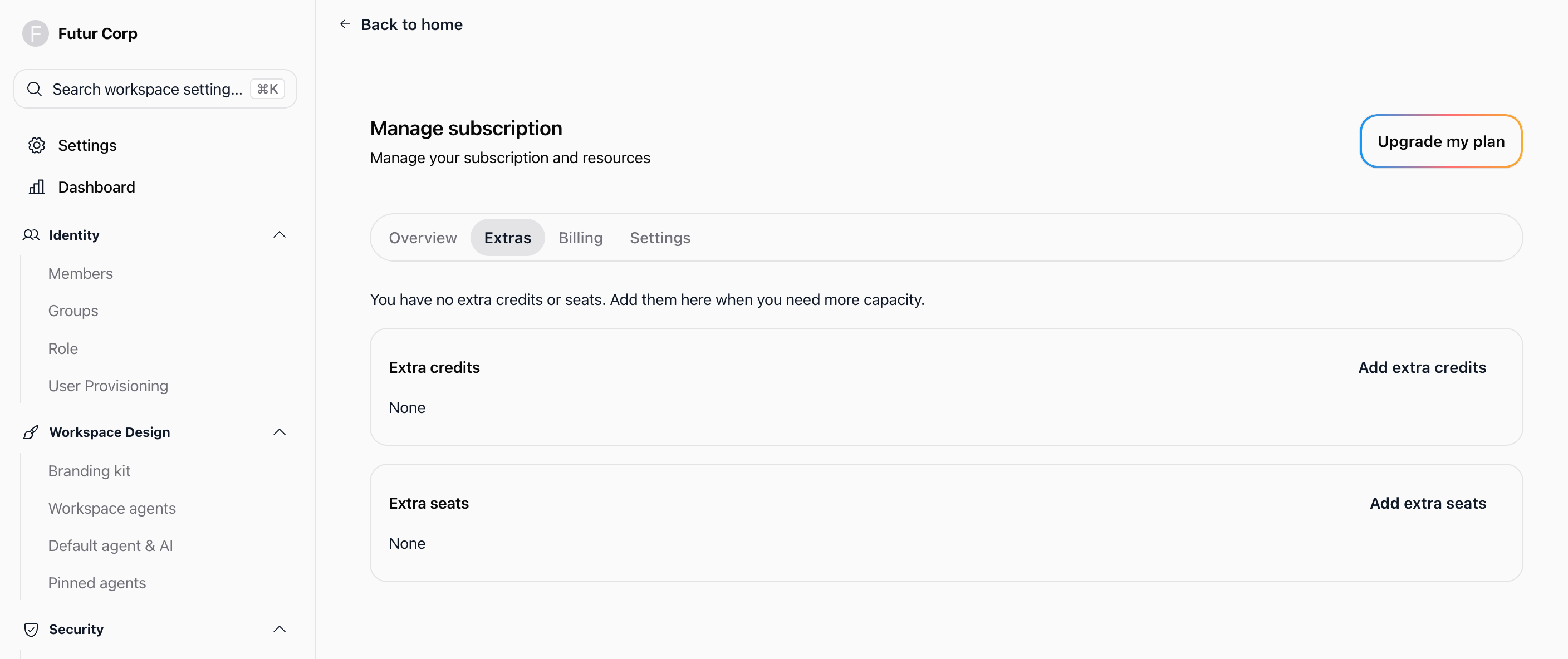
In the navigation menu, select Subscription to open the Manage subscription page.
Click the Extras tab.
In the Extra seats card, click Add extra seats.
In the Manage seats modal, verify your active payment method under Payment method (or click Manage payment method to update it).
Under Number of Seats, view your base included seats and adjust the User seats counter using the — and + buttons.
Click Confirm to save the changes.
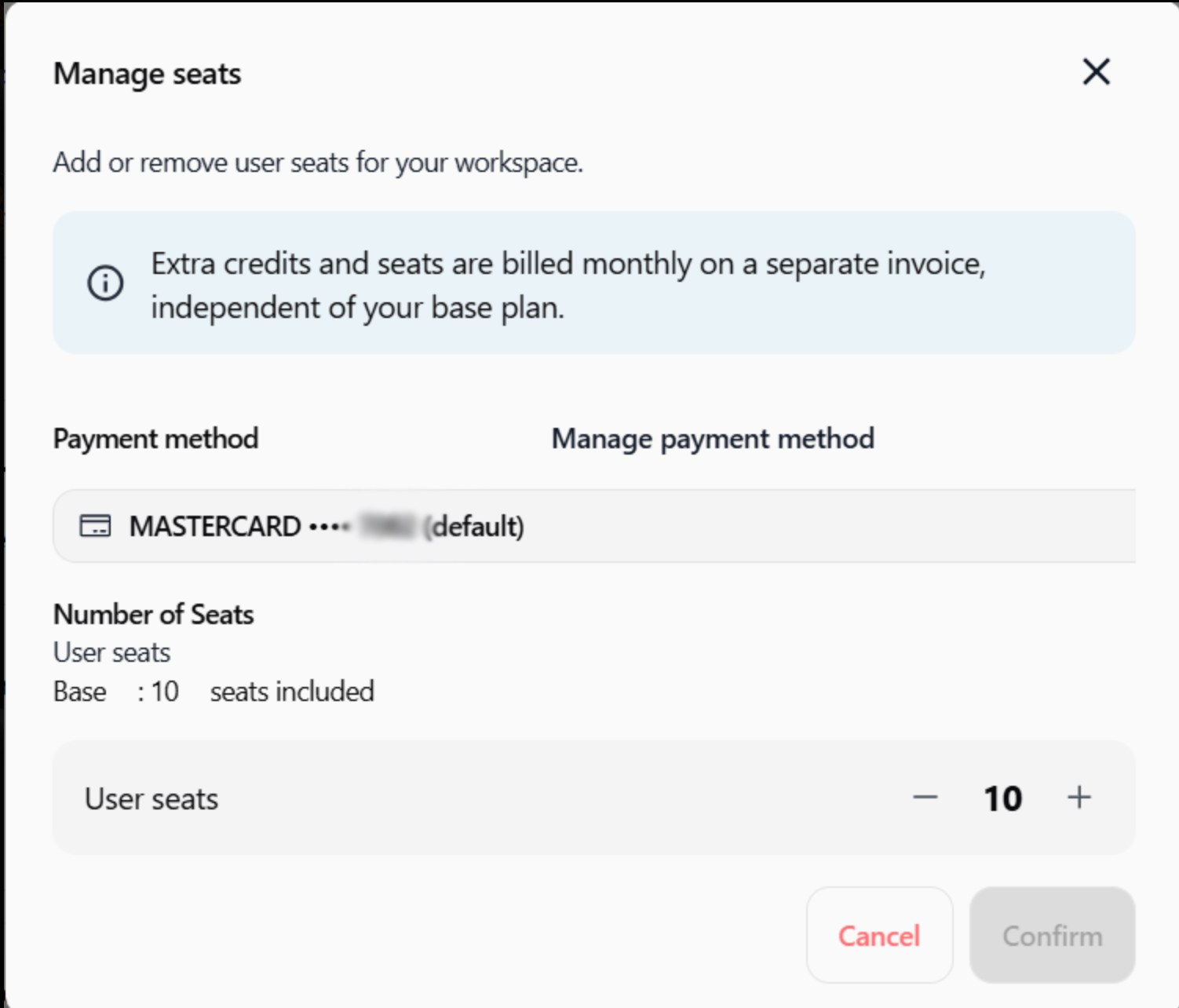
The additional user slots become available immediately in your workspace.
Reducing extra seats
Navigate to Subscription → Extras.
Click the management option in the Extra seats card.
In the Manage seats modal, click the — button to decrease the number of seats.
Ensure the total seat count does not fall below the number of currently active members in your workspace.
Click Confirm to apply the updated capacity.
Practical use cases
Handling seasonal workload peaks
A company brings in seasonal contractors for a short-term project. The administrator adds five extra seats for the project duration and removes them once the project ends.
Scaling team size between plan tiers
A workspace on Team Starter reaches its 10-user limit. Adding two extra seats allows immediate onboarding of new hires without jumping directly to the 50-user Team Growth plan.
Departmental pilot testing
A business unit tests Swiftask with selected team members before committing to an organization-wide rollout. Adding extra seats provides access to stakeholders without altering the core plan.
Tips and best practices
Separate billing: Extra seats and extra credits are billed monthly on a separate invoice, independent of your base plan subscription.
Audit active members first: Review Workspace administration → Members to remove inactive users before purchasing additional seats.
Maintain minimum capacity: You cannot decrease extra seats below the number of currently active members in your workspace; remove or reassign members before reducing seats.
Verify payment methods: Ensure a valid payment method is configured under Manage payment method to avoid transaction failures when updating seats.
Troubleshooting
The system prevents decreasing user seats
Cause: Total seat capacity cannot be reduced below the number of currently active workspace members.
Fix: Go to Workspace administration → Members, remove inactive members, and return to the Extras tab to reduce seats.
The Extras tab or seat controls are inaccessible
Cause: Your account lacks administrative permissions, or the subscription has been canceled or expired.
Fix: Confirm you hold the Owner, Admin, or Billing Partner role, and verify that your subscription is active.
Invited members cannot join despite purchasing extra seats
Cause: Pending invitations might already be occupying the newly added slots.
Fix: Navigate to Workspace administration → Members, check the pending invitations list, and revoke any unused invitations.
Additional resources
Subscription – Overview of workspace plans, limits, and billing configuration.
Managing members – Learn how to invite members, assign roles, and monitor workspace capacity.
Plans & limits – Detailed thresholds and resource allocations across all subscription tiers.
Billing FAQ – Common questions regarding billing schedules, invoices, and payment methods.
Was this helpful?
Still need help? Ask the team